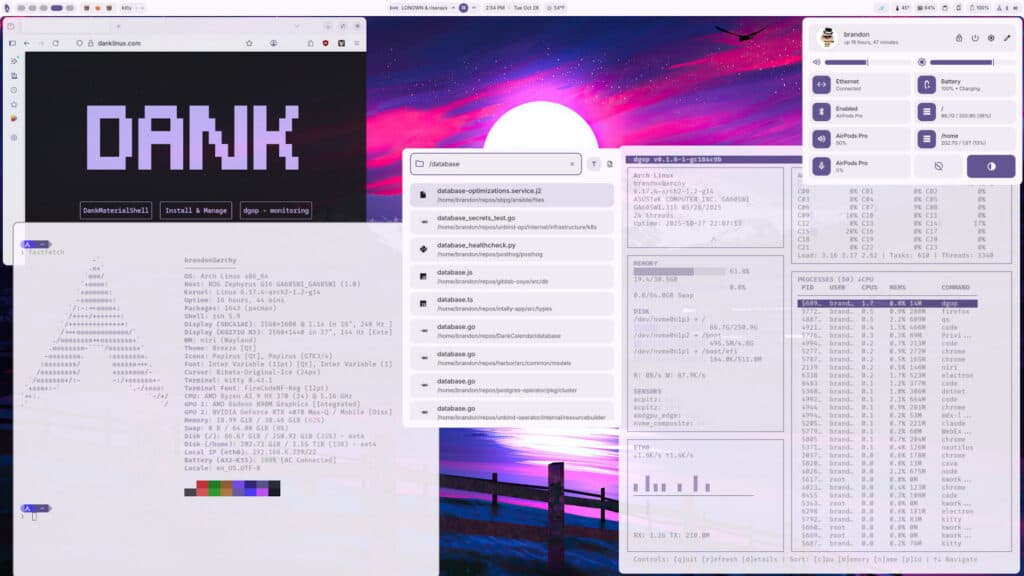
DankMaterialShell 1.5, codenamed “The Wolverine,” is now available as a major update to this Wayland shell suite designed to give compositors such as Hyprland, Niri, Sway, Labwc, MangoWM, and Miracle WM a more complete desktop environment experience.
If you haven’t heard of it yet, DMS tries to replace the usual pile of separate tools many Wayland window manager users stitch together manually: panel, launcher, notification daemon, lock screen, greeter, system controls, widgets, search, theming, and related desktop pieces.
The 1.5 release is a large one, with the headline feature being the new Frame Mode. Instead of presenting the bar, dock, popouts, modals, and notifications as visually separate elements, Frame Mode can draw them as one connected desktop surface. The goal is simple: make the whole desktop feel less like a collection of independent components and more like a single polished interface.
Alongside this, DMS 1.5 adds new animation options, including “Directional” and “Depth,” plus an optional hover-to-open behavior for popouts. Another major addition is native DankCalendar integration. When the dcal daemon runs, DMS can connect to it over IPC and bring calendar management directly into the shell.
Users can create, edit, and delete events from the shell calendar view, receive reminders through the DMS notification system, and keep agenda data available offline via a local SQLite cache.
DankCalendar supports local calendars as well as Google, Microsoft, CalDAV, and iCloud accounts. The release also notes that OAuth tokens and secrets are stored in the system keyring, such as GNOME Keyring or KWallet, instead of being kept in plain text files.
The greeter also receives a serious round of improvements. DMS 1.5 adds a settings GUI for managing the DMS greeter and greetd settings, multi-user account management, user creation, session options, auto-login settings, custom greeter wallpapers, and per-user theme synchronization. It also improves PAM support, including fingerprint and U2F authentication handling.
For window management, DMS 1.5 introduces a Window Rules Manager for Hyprland, Niri, and MangoWM. Users can view, edit, and create rules from a dedicated settings page, and a new IPC option allows creating a rule for the currently focused window.
Multi-monitor users get a notable improvement with Display Profiles. These allow saving monitor layouts and automatically switching between them when displays connect or disconnect. For example, docking a laptop or plugging in an external monitor can restore the correct layout automatically. Hyprland setups also gain fractional scaling display presets.
Additionally, Hyprland users will note an important configuration change: DMS-managed Hyprland defaults have moved to Lua. When DMS deploys Hyprland configs through dms setup or dankinstall, it now generates native Lua files instead of the older .conf format for managed configuration such as key bindings and monitor/output settings.
MangoWM support has also been expanded, with improved compositor support across the shell, installer, and UI tools, while dankinstall now supports MangoWM as a compositor option.
On top of that, the release introduces Spotlight, a lightweight launcher intended for more minimal setups. It can search applications, files, folders, and settings, and supports prefix queries for narrowing file and directory searches when dsearch is installed.
Another smaller change is the rewritten Notepad utility. It can now convert into a standalone window and back into a shell surface. It also gains MIME-type registration so it can be used as the default text editor for files.
DMS 1.5 also brings native Tailscale controls into the Control Center. Instead of relying on scripts or manual command-line use, users can connect or disconnect from their tailnet, select exit nodes, toggle LAN access while using an exit node, and view active Tailscale IP addresses directly from the shell.
On the system management side, the shell can now handle system updates through supported package-manager backends, switch power profiles, manage XDG autostart applications, configure default apps, and switch between local user sessions.
On the installation side, dankinstall can now run in fully unattended mode, making it more suitable for provisioning, dotfile bootstraps, and automated setups. Users can specify a compositor and terminal directly from the command line and auto-confirm the installation.
Finally, distribution support has been expanded. DMS 1.5 officially adds Void Linux support and introduces compatibility with Ubuntu 26.04 LTS, joining the existing support list that includes Arch Linux, Fedora, openSUSE, Debian, Ubuntu, CentOS, NixOS, and Gentoo.
For additional details, see the announcement.
For those planning to upgrade, there are two important notes. First, the DMS app ID has changed to com.danklinux.dms, so users with compositor window rules targeting the old app ID may need to update them. Second, DMS 1.5 now requires Quickshell 0.3 or newer, dropping support for Quickshell 0.2.
Image credits: DankMaterialShell