Microsoft Gives Visual Studio Code a Modern UI Preview
Microsoft has released Visual Studio Code 1.129, introducing an experimental preview of a substantially modernized interface for this most popular cross-platform code editor.
Instead of adding a new color theme, Microsoft is updating the entire VS Code workbench, improving the visual separation of panels, editor groups, tabs, menus, and toolbars.
The Explorer sidebar, editor panes, Activity Bar, and other sections now appear as distinct surfaces with rounded corners, clearer borders, and visible spacing. Menus display as floating panels, and editor groups are more clearly framed within the window.
This results in a layered, card-like design that boosts visual separation between application areas. Tabs and toolbar controls have been updated to match the new style, and the dark interface now features softer borders and reduced contrast compared to the current stable version.
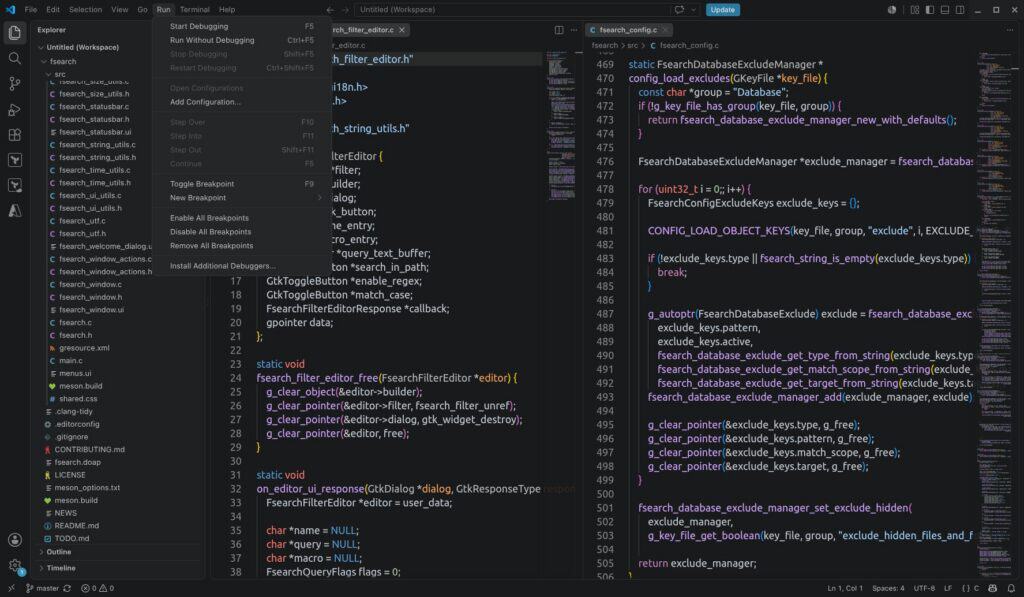
However, keep in mind that the new interface remains experimental and is not enabled automatically in the regular stable build. To enable it, users interested can search the VS Code settings for the workbench.experimental.modernUI option.
The redesigned interface is enabled by default in VS Code Insiders, where Microsoft collects feedback and tests new features before wider release.
In addition, Visual Studio Code 1.129 also introduces a new agent host architecture. Coding-agent sessions now run in a dedicated process, enabling access from multiple VS Code windows. The agent host supports harnesses like GitHub Copilot, Claude, and Codex through the Agent Host Protocol.
The separate Agents window receives an experimental editor panel as well. Agent-generated files and code differences can now be opened in a docked editor beside the conversation, with a shared tab bar that makes the experience closer to working in VS Code’s main editor.
Users can switch between inline and side-by-side diff views, expand or collapse modified files, keep editors open between sessions, and perform additional actions such as creating a pull request directly from the editor. Enable the panel with the sessions.layout.singlePaneDetailPanel setting.
Another new feature allows users to execute terminal commands directly from supported agent-host chats by prefixing messages with an exclamation mark. Agents can also list, inspect, create, and interact with other sessions, but sending messages to another session still requires user confirmation.
Other updates include support for Bring Your Own Key models with the Copilot agent harness, GitHub Enterprise authentication for Copilot via the agent host, and an experimental tool to convert older .prompt.md files into reusable agent skills.
For additional details, refer to the Visual Studio Code 1.129 release notes. Linux users can download it as DEB, RPM, Snap packages, or a standalone archive.