New Free Course, Named Pipes, Multi-kernel and More

We have a new course, Tmux Fundamentals. As evident from the name itself, the course teaches you the fundamentals of Tmux.
A terminal multiplexer like Tmux is a lifesaver if you connect to remote servers via SSH. No more session drops because your laptop went in sleep mode or if you forgot to stay connected in the terminal.
Tmux has a little learning curve, and that’s the reason we created this new course. It is available to everyone for free. Enjoy 😄
Tmux Fundamentals: Free Course on Terminal Multiplexing
Never lose a terminal session again! Learn tmux sessions, panes, and windows in this free, beginner-friendly course. No signup required.

Essential Linux concept: Named pipe redirection
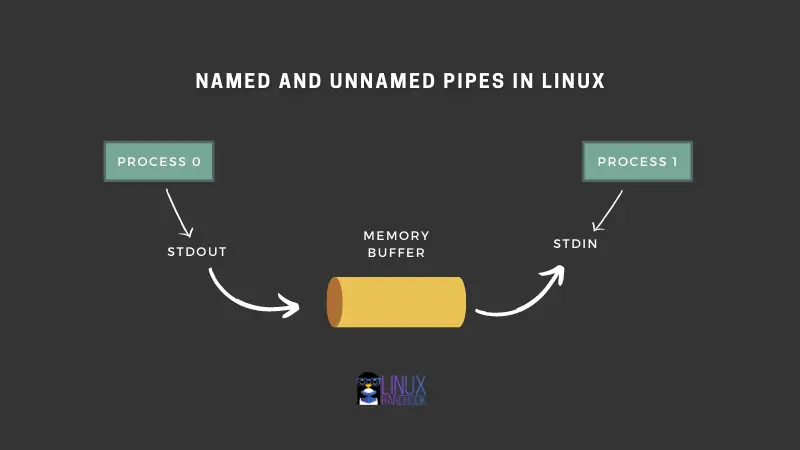
Most linux users are familiar with the concept of redirection. One of the redirections is pipe. The vertical line | in the commands gives Linux an incredible power for combining commands.
But did you know that there is also named pipes that exist like a file in the system. Well, everything is file in Linux so that’s not surprising. Named pipes can store output in memory buffer. It’s an interesting concept that most of us Linux users don’t come across every day.
Pipe redirection in Linux: Named and Unnamed Pipes
There are two kinds of pipes in Linux: named and unnamed. Here’s a detailed look at pipe redirection.
Interested in Linux kernel developments?
Linux Foundation’s instructor led training program on Linux Kernel Internals and Developments is for you. The course is designed to provide experienced programmers with a solid understanding of the Linux kernel.
It is an instructor-led virtual session that will run from 9 to 5 for 4 days. Which means that it is like attending a training class but live on your computer. The next session runs on 28th September.
If you are working in a company, you can ask your boss or company to pay for this training. Tell them that you are getting a 50% discount with ILTGTRITSFOSS coupon code that saves $1750 on this specialized course.
💡Quick terminal tip
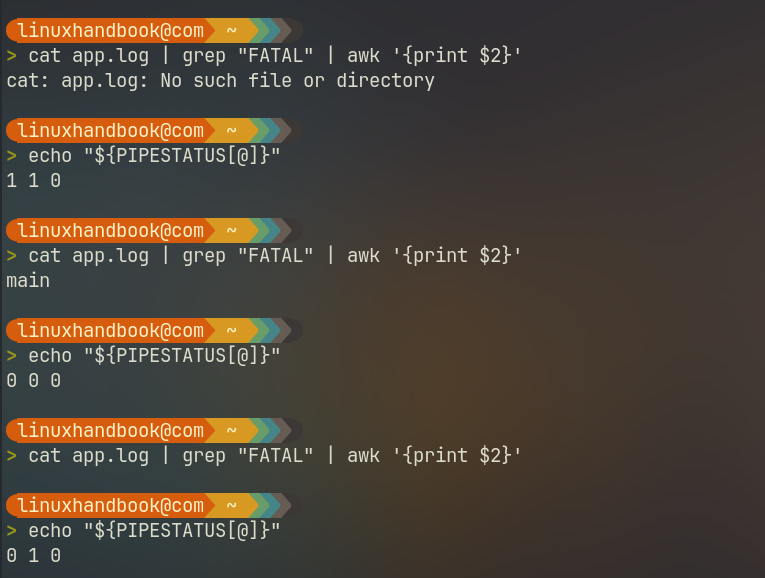
In a pipeline like commandA | commandB | commandC, the shell only records the exit code of the final command (commandC), quietly masking crashes or errors produced upstream.
Bash solves this with the built-in ${PIPESTATUS[@]} array, which captures the discrete exit codes of every stage in your pipeline.
For example, in the below command:
cat app.log | grep "FATAL" | awk '{print $2}'
echo "${PIPESTATUS[@]}"
The ${PIPESTATUS[@]} array preserves the discrete exit code of every process in the pipeline, not just the awk command.
Let’s see if you find your next favorite tool.
Listmonk: Self-hosted, newsletter and mailing list manager
Listmonk is an open-source, AGPL-licensed newsletter and mailing list manager packed into a single Go binary backed by a PostgreSQL database. It features a modern web dashboard with multi-threaded SMTP queues, dynamic templating, SQL-based subscriber segmentation, and an HTTP webhook interface for transactional messaging.
GitHub – knadh/listmonk: High performance, self-hosted, newsletter and mailing list manager with a modern dashboard. Single binary app.
High performance, self-hosted, newsletter and mailing list manager with a modern dashboard. Single binary app. – knadh/listmonk

Updo: Real-Time Uptime Monitoring Tool
Updo is an open-source Go CLI tool that monitors website uptime, response latency breakdowns (DNS, TCP, TTFB), and SSL certificate expiration in real time via an interactive TUI or plain-text mode.
GitHub – Owloops/updo: Uptime monitoring CLI tool with alerting and advanced settings
Uptime monitoring CLI tool with alerting and advanced settings – Owloops/updo
📰 Linux news that matters
😂 Geek humor

💌 Keep on loving Linux Handbook
GitOps course is nearly ready. It should arrive next week.
Perfect time to become a Pro member and enjoy unlimited access to our eBooks, courses and in-depth tutorials.
Missed the previous editions? You can access the newsletter archives.
You may also contribute to Linux Handbook and share your experience and expertise with the community.
I like reading your messages, so just hit the reply button and share your thoughts 😄