OptiScaler Client 1.0.6 adds Heroic Games Launcher support, experimental gamepad support, FSR 4.1.1 for older GPUs
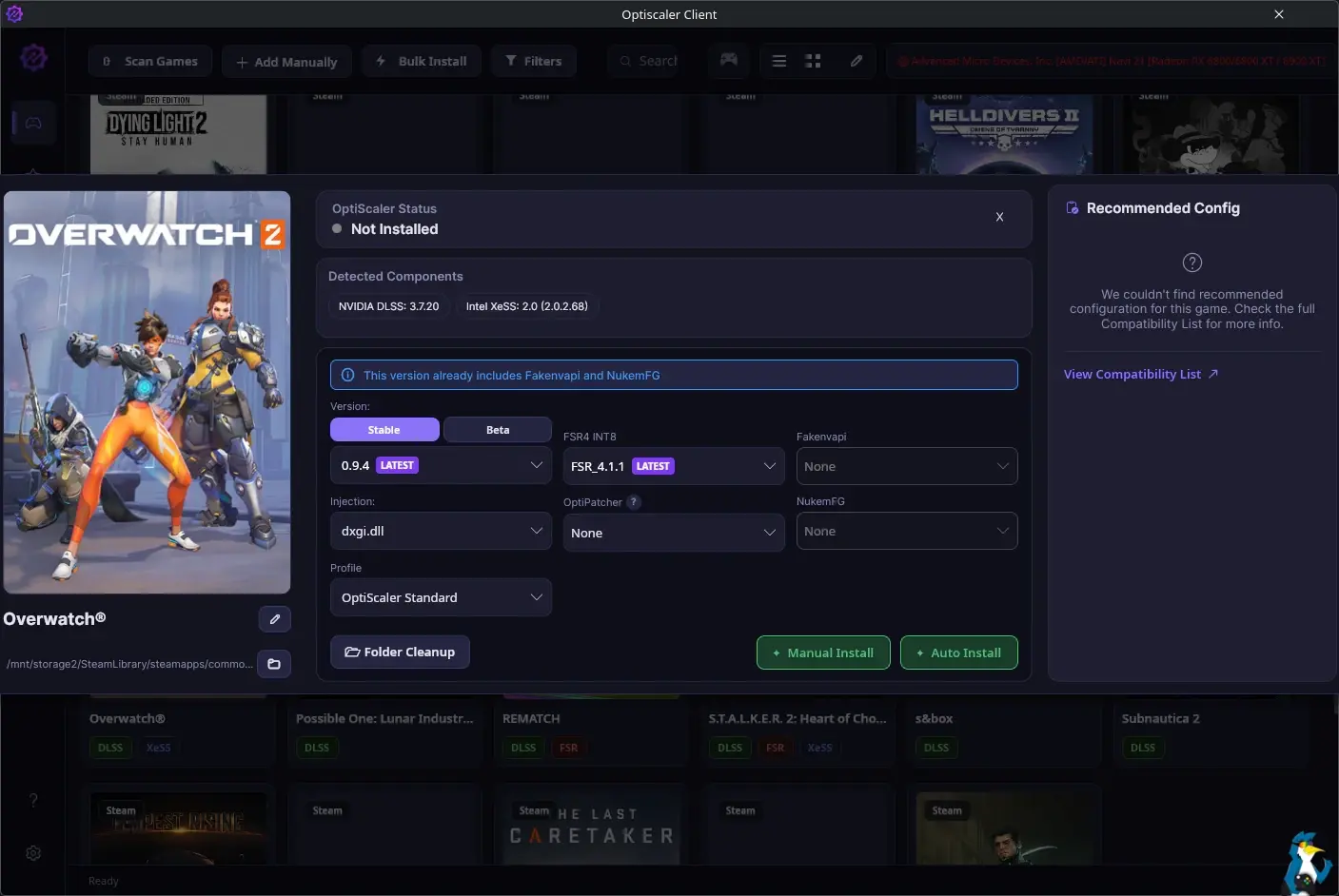
OptiScaler Client is a modern, high-performance desktop utility designed to simplify the installation, management, and update of the OptiScaler mod.
As a reminder on what OptiScaler actually is: it’s a tool that lets you replace upscalers in games that already support DLSS2+ / FSR2+ / XeSS (), as well as manage frame generation in already mentioned games (either by replacing existing FG options or enabling it in DX12 games through experimental OptiFG). It also offers extensive customization options for all users, including those with Nvidia GPUs using DLSS.
The idea with the OptiScaler Client is just to make everything a lot simpler to do. Version 1.0.6 should make it easier than ever too with experimental gamepad support, FSR 4.1.1 for older GPUs (non-RDNA4) and much more.
Added
- Platform & Launcher Integrations
- Heroic Games Launcher Support: Compatibility and integration for Heroic Games Launcher have been added (by @misterj05).
- AUR Support: Added Arch User Repository (AUR) support for Linux users.
- Nix Support: A Nix
devShelland build derivation have been implemented (by @jorikvanveen).
- Controller Support
- Gamepad Support (Beta): Added experimental gamepad navigation support for both Windows and Linux. Controls can be found in the Help view. (Note: This is currently in beta, so some interactions may not feel completely fluid. Feedback and bug reports are welcome!)
- Game Management & Filtering
- Advanced Filtering & Favorites: Three new filters have been added to the Games view, and games can now be marked as favorites.
- Real-time Filtering: Game filtering can now be performed in real-time without needing to scan from scratch.
- OptiScaler Compatibility Integration: A new section has been added to the Manage view for each game, displaying its recommended configuration fetched directly from the OptiScaler compatibility page.
- Help Resources: The Help view now includes a direct link to the OptiScaler compatibility list.
- Upscaler Capabilities
- FSR 4.1.1 (Non-RDNA4): Experimental support for FSR 4.1.1 on non-RDNA4 graphics cards has been included. (Note: This has not been extensively tested; bug reports are appreciated).
Improvements
- Steam Integration Enhancements
- Steam File Parsing Refactor: The parsing logic for Steam files has been refactored to use the robust
ValveKeyValuelibrary (by @brittcraft).
- Steam File Parsing Refactor: The parsing logic for Steam files has been refactored to use the robust
- Version Management
- Smart Version Sorting: Lists for OptiScaler, OptiPatcher, and FSR INT8 now automatically sort to show the latest available version first. This behavior can be toggled via a new switch in the settings (enabled by default).
- Visual & UI Refinements
- Native vs. Added Upscalers Differentiation: Native in-game upscalers and those included via OptiScaler are now visually differentiated. Added upscalers will appear without a background on game covers and will display a purple border in the Manage view.
- Linux Specifics
- Default Configuration Path: The default configuration path for Linux users has been moved to
~/.configor~/.localfor properly saving settings and client assets.
- Default Configuration Path: The default configuration path for Linux users has been moved to
- Localization
- Simplified Chinese Translation: Corrected and updated the Simplified Chinese translation (by @juij-fun).
Fixes
- Installation & Updates
- Settings Backup & Restore: Fixed an issue where game-specific settings were lost when updating OptiScaler. Settings are now backed up and restored automatically during updates.
- Reinstallation Functionality: Resolved a bug where reinstalling OptiScaler via the client caused it to lose functionality.
- Linux & SteamOS Fixes
- FSR4 INT8 Deployment Bug: Fixed a bug on SteamOS where the client failed to copy the FSR4 INT8 bundle to the correct game folder, preventing the OptiScaler GUI and FSR4 options from loading (e.g., in Achilles: Legends Untold).
Some pretty fantastic additions there!
Are you using OptiScaler? Let us know what for in the comments and tell us how you’re getting on with it.
🌐 External Sources: GitHub – Optiscaler-Client – OptiscalerClient-1.0.6